


TL;DR:
- Managing notifications and scheduling fixed screen times help reduce stress and improve digital wellbeing.
- Research indicates that structured digital detoxes lower anxiety, enhance sleep, and boost stress resilience.
Digital wellbeing tips are actionable strategies that help you manage technology use to protect mental health, sharpen focus, and reclaim time from compulsive screen habits. The field is formally known as digital wellness, and it covers everything from notification management and scheduled screen windows to structured detox periods and mindful content choices. Research now confirms that structured detox interventions reduce anxiety, improve heart-rate variability, and support better sleep. Whether you spend eight hours at a desk or scroll through your phone before bed, the practical habits in this guide are built on evidence, not guesswork.
How can managing notifications and scheduling screen time improve your digital wellbeing?
Constant notifications are one of the most underestimated sources of daily stress. Every ping pulls your attention away from the task at hand, and the cognitive cost of refocusing adds up across dozens of interruptions each day. Disabling nonessential notifications frees cognitive resources without requiring you to put your phone in a drawer permanently. The fix is simpler than most people expect.
The approach is sometimes called notification “surgery.” You audit every app on your device and ask one question: does this alert require an immediate response? Social media updates, promotional emails, and news apps almost never do. Turn those off entirely. Keep alerts only for calls, direct messages from close contacts, and calendar reminders. This single change reduces attentional interruptions more reliably than any productivity app.
Scheduling replaces the habit of constant checking. Instead of glancing at email or Instagram every few minutes, you designate two or three fixed windows per day for those activities. Positive Psychology’s digital boundaries guidance recommends batching check-ins rather than engaging continuously, which trains your brain to stop expecting a reward every time you pick up your phone.
- Turn off all social media, promotional, and news notifications
- Keep alerts only for calls and direct messages from close contacts
- Check email and social media at fixed times: morning, midday, and early evening
- Use your phone’s built-in focus or Do Not Disturb mode during deep work or family time
- Review your notification settings monthly as new apps accumulate
Pro Tip: Set your phone to deliver notification summaries at scheduled times rather than in real time. Both iOS Screen Time and Android Digital Wellbeing include this feature, and it alone can cut reactive phone use by a significant margin.
What are effective digital detox strategies supported by research?
A digital detox is a defined period during which you deliberately reduce or eliminate recreational screen use. The most credible evidence comes from a randomised controlled trial examining a two-week intervention that capped recreational screen time, banned device use during working hours, and prohibited screens in the hour before bed. Participants showed reduced anxiety and measurably improved heart-rate variability, a physiological marker of stress resilience. That is not a minor lifestyle tweak. It is a clinically meaningful shift in how your nervous system responds to pressure.
A separate trial with 467 iPhone users found that removing mobile internet access for two weeks halved average daily screen time, and roughly 91% of participants improved across attention, mental health, and subjective wellbeing. The implication is clear: even a partial, time-limited reduction produces measurable gains.
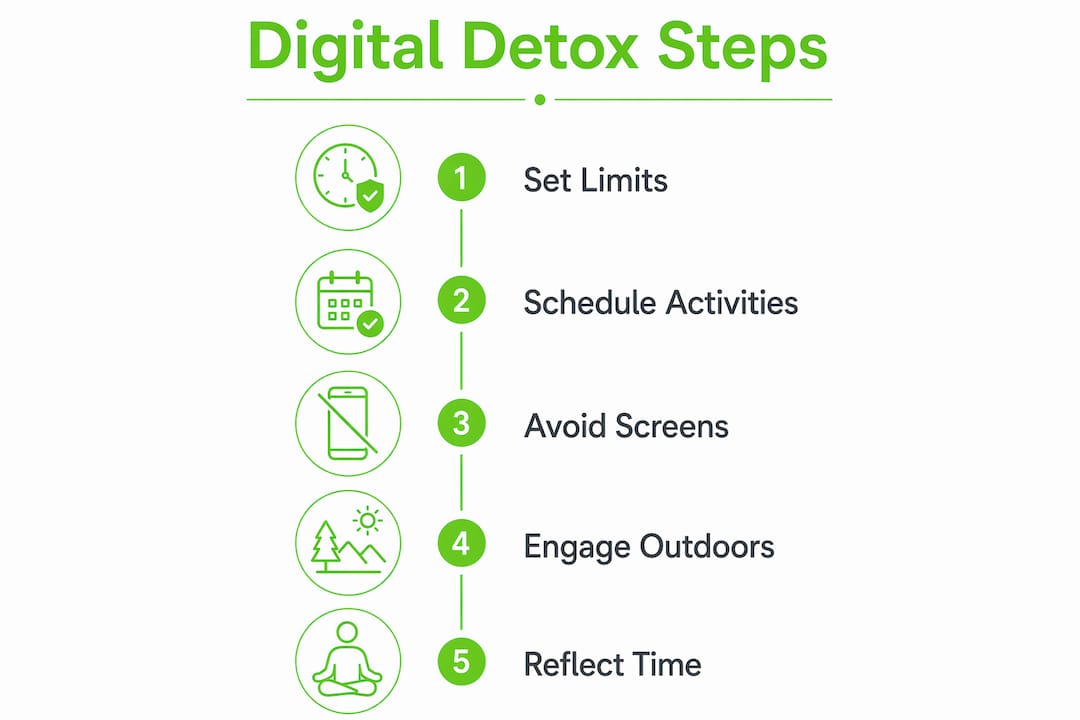
Here is a practical framework for planning your own detox:
- Set a clear duration. Two weeks is the evidence-backed minimum for physiological change. A weekend is better than nothing, but do not expect lasting results.
- Define your caps. Decide the maximum recreational screen time per day, for example, one hour, and stick to it.
- Identify your high-risk windows. Most people scroll most heavily in the first 30 minutes after waking and the hour before sleep. Protect those windows first.
- Schedule replacement activities before the detox begins. Research confirms that pairing detox with alternatives such as mindfulness, exercise, journalling, and social time significantly improves adherence.
- Recruit accountability. A friend, partner, or colleague who knows your plan increases the likelihood you will follow through.
| Detox element | Evidence-backed benefit |
|---|---|
| Capping recreational screen time | Reduced perceived stress and anxiety |
| No screens before bed | Improved sleep quality and heart-rate variability |
| Replacement activities scheduled | Higher adherence and sustained mood improvement |
| Peer or mentor accountability | Markedly better compliance with timing rules |
Pro Tip: Book your replacement activities into your calendar before your detox starts. An empty evening is the most common reason detox attempts collapse on day three.
How to balance online content and avoid negative effects like doomscrolling?
Doomscrolling is the compulsive consumption of negative news and distressing social media content, often continuing well past the point where it serves any informational purpose. It amplifies anxiety, distorts your perception of how dangerous the world actually is, and creates a feedback loop where the algorithm serves you progressively more alarming material because you keep engaging with it. The eSafety Commissioner’s guidance is direct: avoiding doomscrolling and applying critical thinking to online content reduces stress and misinformation susceptibility.
The solution is not to go offline entirely. It is to curate your inputs deliberately. You choose what enters your attention, and that choice has a measurable effect on your mood and worldview.
Practical steps for healthier content habits:
- Audit your follows. Unfollow or mute accounts that consistently produce anxiety, outrage, or comparison. Replace them with accounts focused on skills, creativity, or topics you genuinely enjoy.
- Seek diverse perspectives. Consuming only one type of news source narrows your understanding and increases emotional reactivity. Add at least one source that challenges your existing views constructively.
- Use content-blocking tools. Browser extensions such as News Feed Eradicator remove algorithmic feeds from platforms like Facebook without requiring you to delete your account.
- Set a news window. Read or watch news once per day at a fixed time. Checking headlines repeatedly throughout the day adds anxiety without adding information.
- Protect your resilience baseline. Self-care routines including exercise, adequate sleep, and face-to-face social contact make you less susceptible to emotional contagion from distressing content.
If you find that negative online experiences are affecting your mood persistently, reaching out to a counsellor or trusted friend is not an overreaction. It is the appropriate response.
What physical and environmental changes support better digital wellbeing?
Your physical environment shapes your digital habits more than your intentions do. A phone on the bedside table will be checked before sleep regardless of how firmly you resolve not to. Removing the device from the room is a more reliable strategy than relying on willpower. Screen-free zones in bedrooms and at mealtimes protect sleep quality and preserve the quality of face-to-face conversation.

Physical screen use also carries direct physiological costs. Blink rate drops significantly during screen use, which causes dry eyes and discomfort. The American Academy of Ophthalmology recommends regular “look up and away” breaks and adjusting screen brightness to match ambient light. Blue light exposure in the evening suppresses melatonin production, which delays sleep onset and reduces sleep quality.
Practical environmental and physical adjustments:
- Create phone-free rooms. The bedroom and dining table are the highest-impact starting points.
- Apply night mode from early evening. Both iOS and Android offer automatic warm-colour screen shifts after sunset.
- Position your screen at arm’s length and slightly below eye level to reduce neck strain and eye fatigue.
- Follow the 20-20-20 rule. Every 20 minutes, look at something 20 feet away for 20 seconds. This resets your focal muscles and reduces cumulative eye strain.
- Reduce screen brightness in low-light environments rather than increasing it to compensate.
| Environment change | Primary benefit |
|---|---|
| Phone-free bedroom | Improved sleep onset and duration |
| Night mode from evening | Reduced melatonin suppression |
| Screen at arm’s length | Lower neck and eye strain |
| 20-20-20 break rule | Reduced cumulative eye fatigue |
Pro Tip: Charge your phone in a room other than your bedroom. A basic alarm clock costs less than five pounds and removes the most common justification for keeping a phone on the bedside table.
What practical daily routines and tools help sustain mindful technology use?
Sustainable healthy device usage depends on routines, not motivation. Motivation fluctuates. A well-designed morning and evening structure does not. The most effective daily framework for managing online time starts with a tech-free first 30 minutes after waking. Use that window for movement, a nutritious breakfast, or simply a few minutes of quiet. Pairing good nutrition with a calm start supports the mental resilience you need to engage with digital tools intentionally rather than reactively. Naturessoulshop’s guide on nutrient-dense foods explores how diet directly supports cognitive clarity and mood stability.
The end of the workday deserves equal attention. Set a firm cut-off time for work-related digital activity and treat it as non-negotiable. Blurring the boundary between work and personal screen time is one of the primary drivers of tech-related stress for adults aged 18 to 50.
Additional daily habits worth building:
- One screen at a time. Watching television while scrolling your phone fragments attention and reduces the restorative value of both activities.
- Turn off autoplay. Autoplay on streaming platforms is engineered to extend viewing time beyond your intention. Disabling it puts you back in control.
- Weekly self-check-ins. Spend five minutes each Sunday reviewing how your screen use felt during the week. Adjust one habit based on what you notice.
- Combine digital wellness with holistic routines. Exercise, social time, and time outdoors are not just good for physical health. They are the most effective replacements for compulsive screen use. Naturessoulshop’s holistic wellness guide offers a practical framework for integrating these habits.
The tools that support these routines include iOS Screen Time, Android Digital Wellbeing, and browser extensions like StayFocusd and Freedom. These are not parental controls. They are adult tools for designing your own defaults.
Key takeaways
Sustainable digital wellness requires both time boundaries and content boundaries, supported by environmental design and daily routines rather than willpower alone.
| Point | Details |
|---|---|
| Notification surgery works | Turning off non-essential alerts reduces cognitive interruptions without requiring full device breaks. |
| Two-week detoxes produce real results | Structured detox interventions improve anxiety, sleep, and heart-rate variability when paired with replacement activities. |
| Content curation matters as much as screen time | Doomscrolling and negative feeds cause stress independently of total hours spent online. |
| Environment beats intention | Phone-free zones and physical screen adjustments are more reliable than willpower-based resolutions. |
| Daily routines sustain progress | Tech-free mornings, firm workday end times, and weekly self-check-ins build lasting healthy screen habits. |
Why willpower alone will never fix your screen habits
I have watched people attempt digital detoxes with genuine commitment, only to be back to their old patterns within a week. The reason is almost always the same: they changed their intentions but not their environment. The phone was still on the desk. The social media apps were still on the home screen. The evening had no structure to fill the gap left by scrolling. Willpower is a finite resource, and it depletes fastest in the moments when you are tired, bored, or stressed. Those are precisely the moments when screens are most tempting.
What actually works is redesigning your inputs so that the healthy choice is the path of least resistance. Charge your phone in another room and you will not check it at 2am. Delete social media apps from your phone and access them only via a browser, and you will check them far less often. The friction is the feature.
The other mistake I see regularly is treating screen time reduction as the whole solution. Cutting hours online without addressing what you consume during those hours misses half the problem. Thirty minutes of doomscrolling can leave you more anxious than two hours of genuinely enjoyable content. Comprehensive digital wellbeing requires both time limits and content limits, applied together. Start small, build one habit at a time, and measure how you feel rather than just how many hours you logged.
— Arjit
Support your digital balance with natural wellness from Naturessoulshop
Real digital balance does not happen in isolation. The physical habits that support mental resilience, including quality nutrition, restful sleep, and time away from screens, all work together. At Naturessoulshop, you will find a full range of organic and natural products designed to support exactly that kind of holistic wellbeing. From clean-ingredient foods and dairy to vegan and gluten-free options, every product is chosen to complement a lifestyle built around genuine health. If you are building healthier daily routines alongside your digital wellness goals, explore the building healthy habits guide for practical steps that bring nutrition and mindful living together.

FAQ
What are the most effective digital wellbeing tips for adults?
The most effective strategies are turning off non-essential notifications, scheduling fixed windows for checking apps, creating phone-free zones in the bedroom and at mealtimes, and pairing any screen reduction with deliberate replacement activities such as exercise or social time.
How long does a digital detox need to be to see results?
Research shows that two weeks is the minimum for measurable improvements in anxiety, stress biomarkers, and sleep quality. Shorter breaks still provide relief but are unlikely to produce lasting behavioural change.
Does reducing screen time improve mental health?
Reducing screen time improves mental health, but only when combined with content boundaries. A trial of 467 iPhone users found that removing mobile internet for two weeks improved attention and wellbeing in approximately 91% of participants.
What is doomscrolling and how do I stop it?
Doomscrolling is the compulsive consumption of distressing online content beyond any informational need. Stop it by setting a single daily news window, unfollowing anxiety-producing accounts, and using browser tools to remove algorithmic feeds from social platforms.
How can I reduce eye strain from screen use?
Apply the 20-20-20 rule: every 20 minutes, look at something 20 feet away for 20 seconds. The American Academy of Ophthalmology also recommends adjusting screen brightness to match ambient light and enabling night mode in the evening to reduce blue light exposure.


